DogGame!
Desktop search engine for archived web pages.
Searching the internet is hard when you have no internet.

This is the search page for DogGame!, the search engine that me and Matt Loots built as a school project.
Motivation #
Over the summer I visited some family at a house with no wifi for a few weeks. No wifi is great for doing things; Not enough bandwidth for youtube on hot spot, but plenty for reading and research (you know, the good parts of the internet). During this trip I was trying to learn about policy gradient methods and I was keeping all of my tabs open as I read so I could go back to old pages when I had questions. However, after accidentally closing my browser one too many times, I realized how helpful it would be to have a tool to save webpages directly onto my device. Chrome has functionality to save pages built in which works most of the time but even then, once you’ve saved a lot of pages it can get difficult to find the one you’re looking for. The idea of making a local search engine like this was then put on the “potential future projects” list (that’d be a fun tab to add to this website) until school started back up and it was time to pick a project for the year.
Saving Pages #
We wanted a method to save pages with images and javascript generated content (like figures, some medium code boxes, stuff like that) all in one file. There is a built in function in Chrome that dumps a snapshot of a webpage like this into a format called MHTML. MHTML is a bit of a strange format. It is actually mail format but it is meant for html data so it worked very well. The only downside is that even though Chrome can parse and render these files no problem, if the data is sent over by a webserver Chrome treats it like a regular file and decides to just download it instead of rendering it. This wasn’t too big of an issue because we were able to parse the file back into html before sending it to chrome and this fixed the issue.
We also added functionality for parsing of PDF and raw text documents.
Ranking Searches #
We tried a few simple methods but stuck with TF-IDF since it was performant enough for our relatively small corpus of documents (<1000) and straightforward to implement. We planned to experiment with more and potentially look into some optimization based methods, but school got busy that year so we kept it simple in order to pass all of our other classes.
System Design #
I dug up an old diagram that is still mostly accurate:
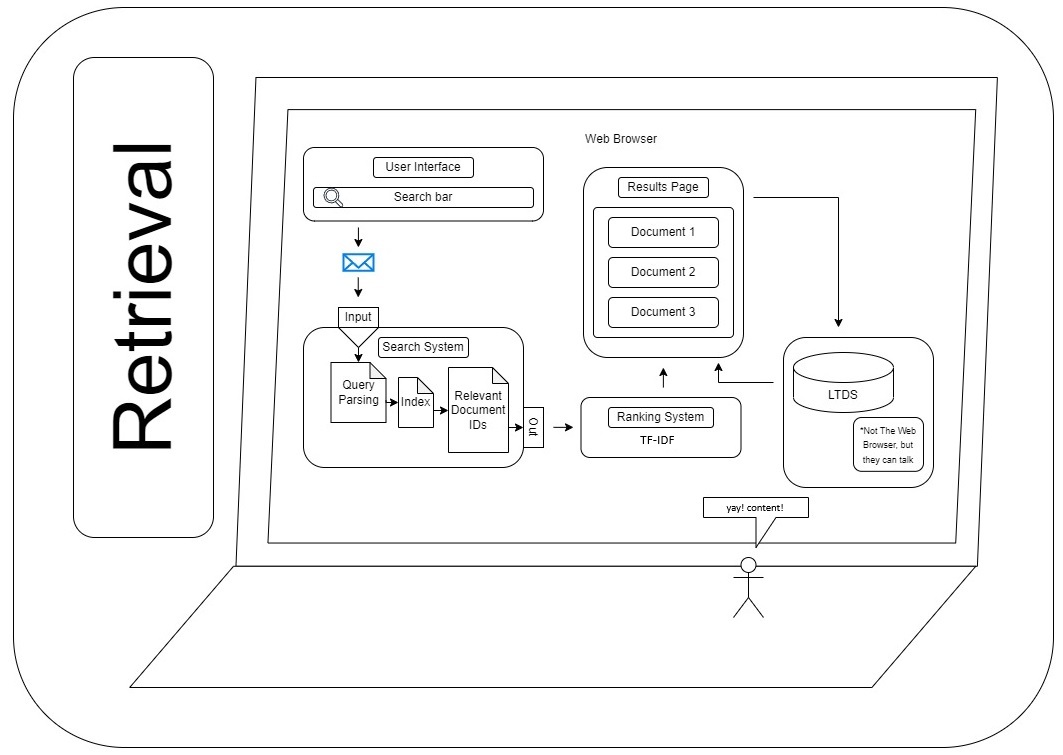
- The user enters a query
- The query is parsed into keywords
- Those keywords are used to retrieve a set of potentially relevant documents from the index
- Those documents are then ranked
- Ranked documents are returned to the user in a search page like any search engine.
Deployment #
We made a Dockerfile for the project so that it can be easily run and mounted to the host filesystem. Since this is a python project though, the way I use it to this day is just running it in the background on my host system using pythonw, and uv for env management. Both work but python is lighter than Docker.
Bonus: The Current Archive #
Since links are preserved in the MHTML documents we actually have a graph view made with d3 js that we used in one of our presentations. You can search in this view too but I never do. It is neat though.
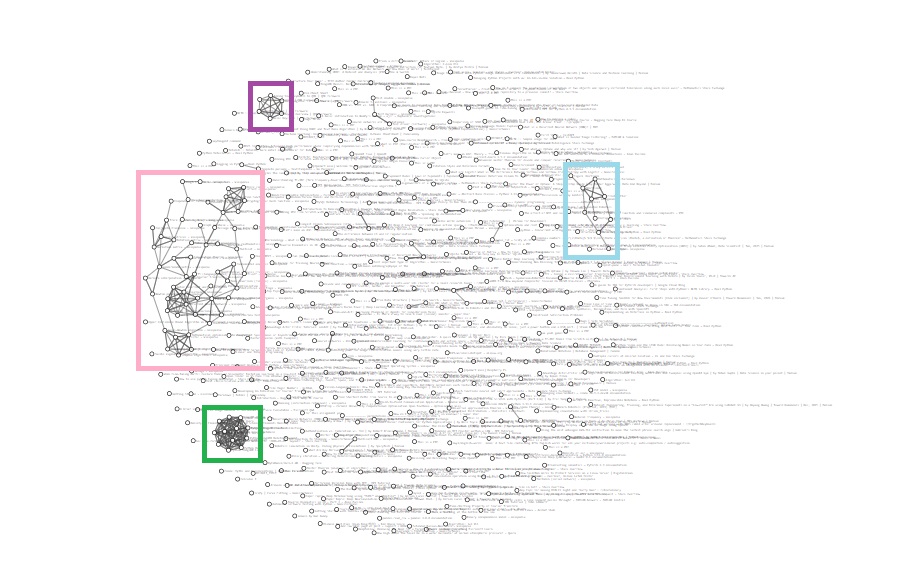
- The purple cluster is several pages from the QMK docs.
- The light blue are pages about Hugo (mostly docs again).
- The super dense cluster in green is a bunch of MongoDB documentation from when we were researching if it would be a good fit for this project (it was not, it is capable but it is very beefy and overkill for the scale of this project).
- Finally the pink cluster is a ton of Wikipedia articles mostly about various math and machine learning topics.
I like that the largest topic in my personal corpus is what originally motivated the project :]
Code for this project will be made available on Github once permission is granted by DigiPen.